

Account health
Each account carries a status:The label is rendered from the raw status, so
reauth_required displays as reauth required. It means the same thing.Reconnecting
Open the account and re-run the authorization. Nothing about your connections, mappings, or history is lost — you are refreshing a credential, not rebuilding the setup. Syncs resume once the account returns toactive.
Reconnect when:
- The status is
reauth required. - You changed your password on the provider.
- Your workspace role changed, or someone revoked the app’s access.
- You want to widen the grant — for example, to expose an Airtable base Synclify can’t see.
Refreshing resources
Synclify discovers your bases, tables, sites, and collections when you connect. Newly created resources appear after the account refreshes its resource list. If a table you just made is missing, reopen the account on the Data Sources page. The page paints immediately from a stored snapshot and then revalidates in the background, so it is fast on open. An account is only re-read live when it is unhealthy or its snapshot is stale — a freshly checked account costs no provider calls at all. If a provider refuses discovery, the account shows a banner carrying the provider’s own message rather than an empty list. An Airtable account that has hit its monthly API limit, for example, says so in Airtable’s words.Webhook health
Each account also reports whether its webhooks are delivering, with an explicit Refresh check — never automatic, because each check performs live provider inventory reads. See Realtime health.Disconnecting an account
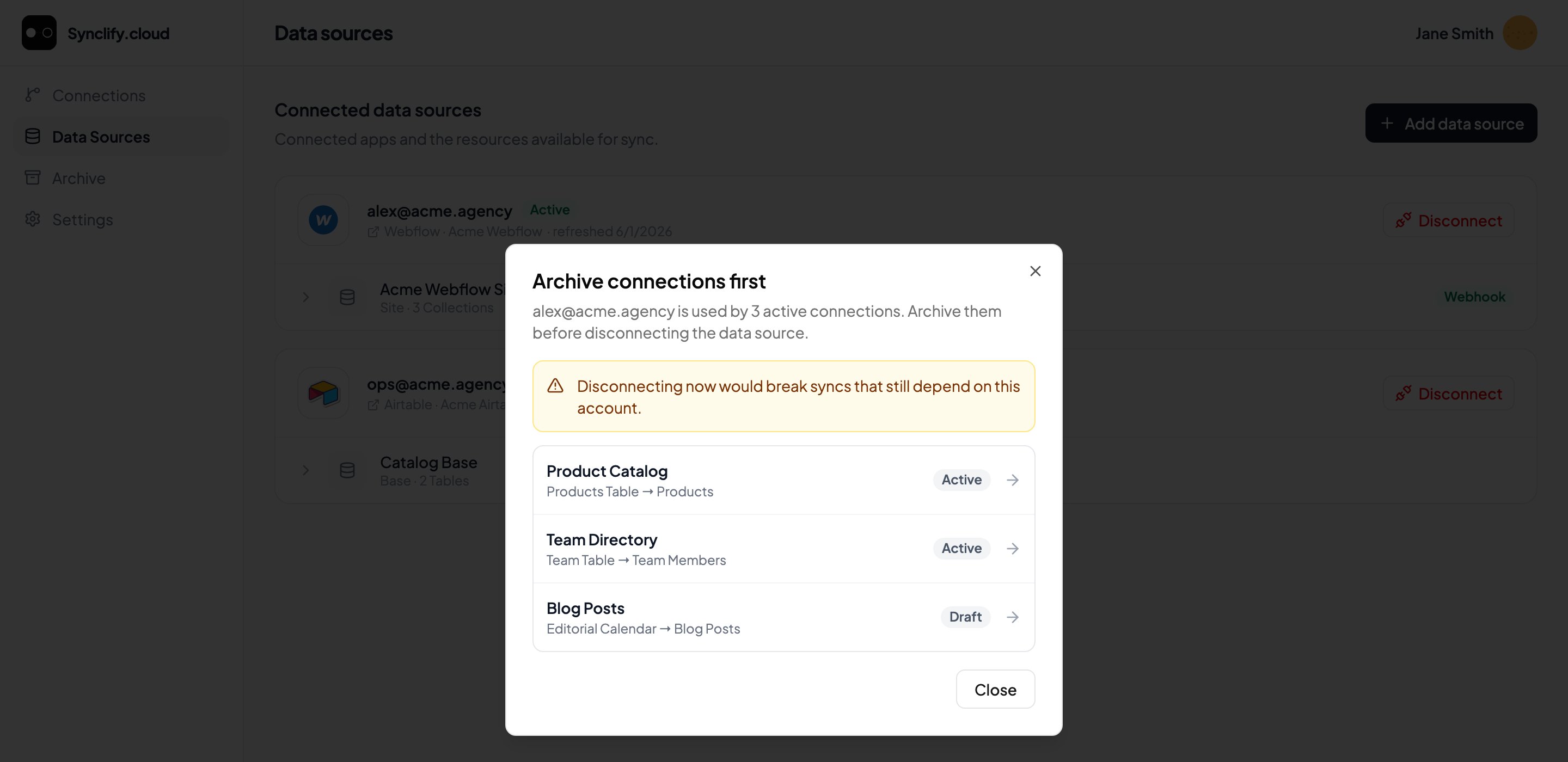
Disconnect is blocked while connections still depend on the account.
1
Archive dependent connections
Every connection using the account must be archived first. See Delete and archive.
2
Type the exact confirmation
Not a checkbox. You type the confirmation string exactly as shown, so the action cannot be clicked through.
3
Prove it's you
A step-up identity check. If you have two-factor on, it asks for an Authenticator or recovery code; otherwise for your Current password. The value is submitted once and is not kept in browser state.
4
Watch it through
Progress is durable. Close the dialog or reload the page and reopening resumes at the operation’s real status rather than starting again.
If revocation needs another attempt
When a disconnect lands in a state needing review, the dialog offers Retry provider revocation — and asks you to verify again: “A fresh identity check is required before another revocation attempt.” Confirm once more and Authorize retry.Active connections still use this account. Archive them before disconnecting.
Active connections still use this account. Archive them before disconnecting.
The blocking case above. Archive them and return.
A provider write is still unresolved. Wait for it to settle, then retry this request.
A provider write is still unresolved. Wait for it to settle, then retry this request.
A write is in flight. Disconnecting mid-write is exactly what the fence exists to prevent.
Verification expired or was already used. Verify your identity again.
Verification expired or was already used. Verify your identity again.
Step-up proofs are single-use and short-lived. Start the verification again.
Confirmation did not match. Return and type the exact confirmation.
Confirmation did not match. Return and type the exact confirmation.
Character for character, including case.
This request conflicts with an earlier attempt. Close this dialog and start a new disconnect request.
This request conflicts with an earlier attempt. Close this dialog and start a new disconnect request.
Close and start fresh rather than retrying in place.
No verification factor is available.
No verification factor is available.
“Set a password or enroll two-factor authentication in Security settings.” You cannot step up without a factor to step up with — see Security settings.
Too many verification attempts.
Too many verification attempts.
Wait before trying again.
Retrying the same request is safe. Requests carry an idempotency key, so a retry resumes the existing operation rather than starting a second one.